
Paint Shop validates quietly. It tends to refuse a file rather than explain which rule failed. The checklist below is the set TeslaWrap.NET uses when it writes a wrap PNG, sourced from the official templates Tesla publishes and from the app and vehicle versions that expose Wrap Upload. If a file you made elsewhere is rejected, walk the same list in order.
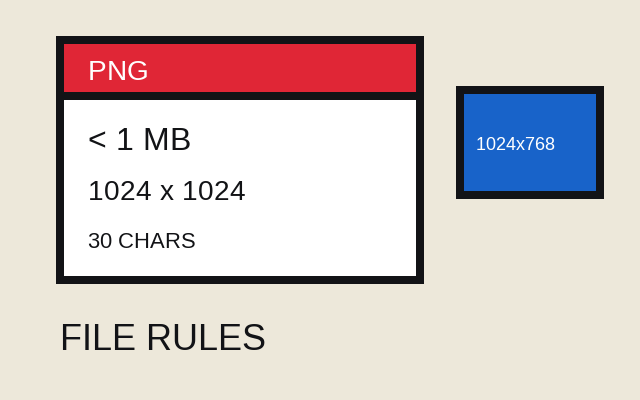
The file rules TeslaWrap.NET exports against
| Requirement | Value | Note |
|---|---|---|
| File format | PNG | Transparency in the template masks artwork to body panels. |
| Image size | 512 x 512 to 1024 x 1024 px | Square for every vehicle except Cybertruck. |
| Cybertruck size | 1024 x 768 px | From the official template files in teslamotors/custom-wraps cybertruck/. The only non-square official template. |
| File size | Max file size: 1 MB | Files no larger than 1 MB are accepted; larger files are rejected on upload. |
| File name | 30 characters or fewer | Letters, numbers, spaces, hyphens, and underscores. |
| Wrap slots via the Tesla app | 10 | Creations, then Wrap, then Upload. |
| Wrap slots via USB | 10 | Separate from the app slots. Top-level folder named Wraps. |
| Minimum app version | Tesla app 4.59.0 | Creations > Wrap > Upload arrived on 2026-07-21. If Wrap or Upload is missing in Creations, update the Tesla app and the car's software to the latest release. |
| Official templates | 12 vehicle variants | github.com/teslamotors/custom-wraps |
How to check a PNG before you upload
- 1
Confirm it is a real PNG
The extension must match the bytes. Renaming a JPEG to .png does not create transparency. A screenshot flattens the official holes onto a solid background, so the car shows artwork in the gaps.
- 2
Match the template size
Square files must sit between 512 x 512 and 1024 x 1024. TeslaWrap.NET exports 1024 x 1024 for every official variant except Cybertruck, which is 1024 x 768. A Model Y square will not load on a Cybertruck.
- 3
Keep the file no larger than 1 MB
Anything above 1,000,000 bytes is refused. PNG Converter reduces colors only if the file would otherwise miss that cap. The Fit Tool is free, needs no account, and refuses an export that would exceed 1 MB rather than silently posting an oversized file.
- 4
Shorten the filename
Count characters including the .png suffix. Thirty is the ceiling. Long editor names are the most common silent rejection. Stick to letters, numbers, spaces, hyphens, and underscores.
- 5
Export from TeslaWrap.NET when you can
PNG Converter and the Fit Tool both write to the official canvas and keep the template alpha. The Fit Tool is free and needs no account. Pick the same variant you will upload, then take the PNG to the Tesla app or to a USB Wraps folder.
Cybertruck is the size trap
Eleven of the twelve official templates are square. Cybertruck is 1024 x 768 from the official template files in teslamotors/custom-wraps cybertruck/, and the panel polygons are authored for that rectangle. Stretching a 1024 x 1024 Model Y file to look like it might fit does not convert the layout. The islands stay in the wrong places. Use the Cybertruck hub, then export from PNG Converter or the Fit Tool with Cybertruck selected. The Fit Tool is free and needs no account.
The Fit Tool is free and needs no account. Use it when you want to place a graphic on one island and keep the rest of the sheet empty. PNG Converter is the other path: it stretches a full image to the vehicle canvas, then cuts the official template. Open the PNG Converter page to read how it works. Sign in to generate. Generating and previewing do not use credits. The first PNG Converter download each Pacific Time (Los Angeles) day is free after you sign in. After that, each new download uses 3 credits. Downloading the same result again does not.
Slots, versions, and what the PNG is for
The Tesla app holds ten wraps. A USB drive holds another ten if you format it exFAT or FAT32 and put the PNGs in a top-level folder named Wraps. Those two sets do not share a counter. When a set is full, delete one wrap before you add another. Tesla app 4.59.0 or newer. If Wrap or Upload is missing in Creations, update the Tesla app and the car's software to the latest release.
A Paint Shop PNG only changes the vehicle rendering in the Tesla app and on the car screen. It is not a vinyl plot, not a paint formula, and not a file a body shop can use to wrap the physical car. TeslaWrap.NET is an independent project, not affiliated with Tesla, Inc. We generate artwork and fit it to the publicly published wrap templates.